
Deck Design From a Photo: Sell the Board They Can See
How to show homeowners a new deck, boards and railing on their own house before the quote, how to shoot the photo, and what a deck rendering can't do.
By KeSean Fallon

You can show a client a new deck from a photo by turning a phone picture of their backyard into a photorealistic concept of the same house with the deck built. With an AI rendering tool it takes about 30 seconds, and you can then change the boards, railing or layout one at a time while the house stays exactly as it is.
That last part is what decks are really sold on. Homeowners rarely struggle with "do we want a deck." They struggle with which one.
A deck sample can look great in isolation and completely different once you hold it against the back of a house. Picture a homeowner comparing a warm brown composite board with weathered gray, then looking up at the brick, trim and patio doors. Neither option is obviously wrong. The trouble is picturing a few inches of material stretched across an entire deck, with railing and stairs added. That's where a photo-based concept earns its place. Instead of debating which sample might work, you can show both versions against the home itself.
Why do deck sales stall on material and color?
Because the decision is made with a 6-inch sample in the hand and a whole house in the background. A board that looks warm in the showroom can look orange against brick. A gray that reads modern on a website can look cold against beige siding.
So the homeowner does the sensible thing. They take the samples, prop them against the back wall, and wait a week to see them in different light. Meanwhile, they collect two more bids.
The questions underneath are almost always visual:
- Will this color go with our siding and trim?
- Will a black railing look sharp or heavy?
- Should the deck be one level or step down to the yard?
- Does a privacy screen or pergola make it feel cozy or closed in?
What are the ways to show a client a deck before you build it?
Manufacturer deck planners. Decking brands offer free design tools. Deckorators, for example, launched a Deck Visualizer that lets users "create vivid designs in 3D and view from any angle" and pull building plans and a materials list; its web version lets you upload a photo of the house for reference (UFP Industries). These tools are good for layout and quantities, and they are tied to one brand's product line.
Deck design software. MiTek's Deck Designer creates scaled deck drawings, and its designs "include complete material and cut lists as well as permit submittals and 3D renderings" (Pro Remodeler). That is built for planning the deck, not for showing it on the client's real house in a photo.
Sample boards and portfolio photos. Good for texture and proof of workmanship. They still ask the homeowner to imagine the result on their own house.
An AI concept from a photo. You take one photo of the back of the house and generate a photorealistic concept with the deck in place. With Renderspace a render typically comes back in 20 to 40 seconds, and settings carry over, so you can change one thing at a time: the board color, the railing, a spa built in, a privacy screen.
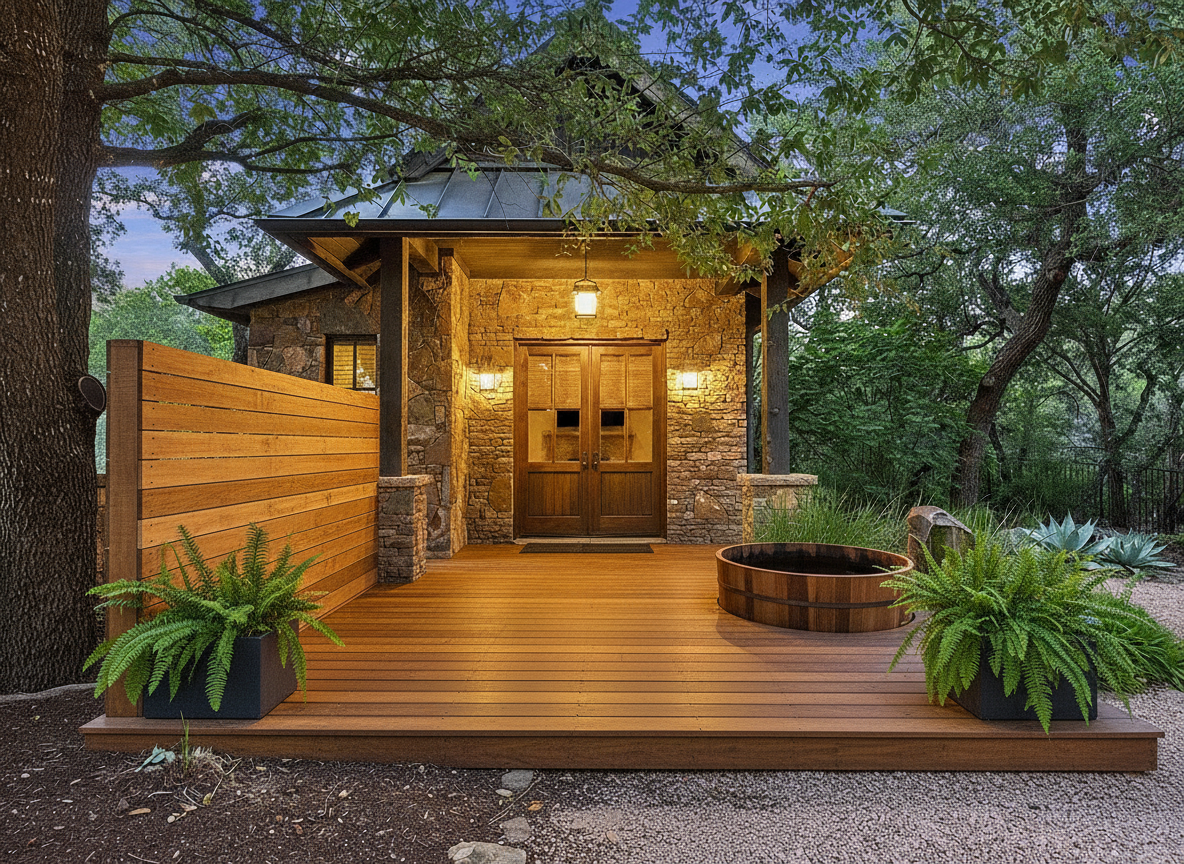
See this concept in the Renderspace gallery
How do you take the photo for a deck concept?
- Stand in the yard, facing the back of the house, far enough back to include the doors the deck will connect to.
- Get the whole wall and the ground line so the concept can show height and steps.
- Shoot level, in even daylight. Avoid harsh noon shadows across the wall.
- Take a second photo from the back door looking out if the view from inside matters to the client.
I'd tell deck builders to stop treating the railing as an afterthought. You can choose a beautiful board color and still end up with a deck that feels boxed in because the railing cuts across the view from the kitchen. Before showing ten finish options, start with the proportions: where the deck meets the door, where the stairs land, and what someone sees while sitting outside. Then use specific prompts to compare black metal, cable or wood railings without changing the whole idea.
What should the first deck concept decide?
Keep the first round to the choices the homeowner is actually stuck on:
- Board color and tone against their siding and trim.
- Railing style. Wood, black metal, cable or glass.
- Shape and levels. One platform or a step-down.
- Add-ons. A spa, a pergola, a privacy screen, lighting.
Show two versions. Change only one thing between them. When the homeowner says "that one," your proposal follows it. For the patio, steps and walls around the deck, see the hardscape visualization guide.
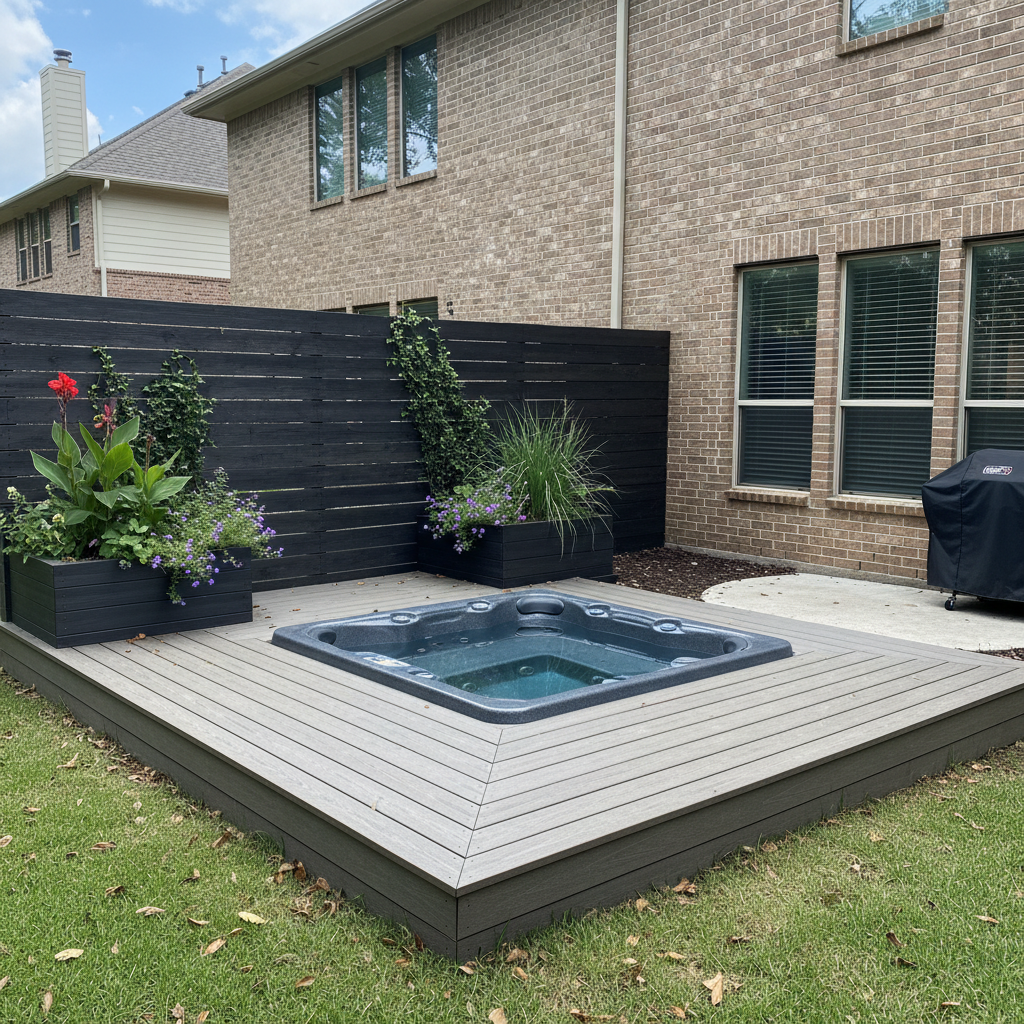
See this concept in the Renderspace gallery
What can't a deck rendering do?
It does not size joists, beams or footings, check spans or ledger attachment, or produce a permit set. It is a visualization for presentation, not an engineered plan or construction drawing. Keep framing, code and permits with your design process, your supplier's guidance and the local building department, and label the concept as a visualization in the proposal.
In Central Texas, I'd bring up sun exposure before asking anyone to fall in love with a dark board color. Shade can matter as much as finish when someone wants to use the deck through summer. Cedar and composite raise different questions about appearance and upkeep, too. And if there's an HOA, colors and railings might need approval. A rendering helps discuss those trade-offs, but it doesn't replace checking physical samples or association rules.
What this looks like on a real job
Here's how I'd run the next deck consultation with Renderspace. Start with a photo taken from the lawn, showing the back door, siding and the ground where the deck will sit. Ask the homeowner whether they're leaning toward cedar or composite and what they dislike about the current space.
I'd generate one concept with warm-toned boards, black metal railing and stairs opening toward the yard. Then I'd keep the layout in place and prompt for weathered gray composite to compare the colors against the actual house. If privacy is the concern, I'd try a cedar screen; if it's shade, a pergola.
Renderspace's custom prompts also make it possible to get specific about details like horizontal railing profiles, built-in seating or a particular wood finish. The goal wouldn't be to choose joist sizes on a phone. It would be to settle on a look worth pricing and developing into proper deck plans.
More ways to use the same workflow: visual proposals for homeowners and how to win more landscaping bids without cutting price. Browse more outdoor concepts in the gallery.
Frequently asked questions
Can I design a deck from a photo of the house?
Yes. With Renderspace you upload a phone photo of the back of the house and get a photorealistic concept with the deck in place, in about 30 seconds. It shows the look; framing and engineering come from your design process.
Can I show composite and wood side by side?
Yes. Settings carry over between renders, so you can keep the house and layout the same and change only the decking material or color.
Can I use the renders in my proposals and ads?
Every paid Renderspace plan may use renders in proposals, websites, social and ads. Reselling the images is not allowed.
Is it high enough quality for a printed proposal?
Renderspace exports in 4K, which holds up in a proposal PDF or a printed leave-behind.
The board they pick is the one they can see on their own house
A sample board asks the homeowner to do your selling for you. They have to imagine it across the whole deck, against their siding, in their light, with their back door in the middle of it. Most people cannot, so they wait.
Take that job off their plate. Show them their own house with the deck already built. Then do the thing that actually closes deck jobs: change one choice while everything else stays put. Gray boards to brown. Wood railing to black metal. Add the spa, take it away. The homeowner is no longer imagining. They are choosing.
That is why fast photorealistic concepts help contractors win bids faster. Homeowners commit sooner when they can see their own space finished before the quote.
I built Renderspace for the moment before a contractor knows whether a homeowner will buy. A full design presentation can be worth the effort later, but comparing deck boards shouldn't require one. Take a photo, describe the exact materials and railing, and show what could work on that house.
Run it on one real deck lead. The First Job Test is $19.99 for 40 credits over 7 days, and it works from a phone photo.
Rather have a full set of concepts made for your team? Human Polish render packs do it for you.
Related reading
- Hardscape Visualization: Turn a Job-Site Photo Into a Client-Ready Concept
Hardscape sells on permanence, which makes it hard to sell with words alone. A photo-to-concept workflow on-site closes the picturing gap without replacing engineering.
- Visual Proposals for Homeowners: Show the Finished Job
What a visual proposal is, why homeowners sign sooner when they can see the finished job, and how to build one from a site photo step by step.
- How to Win More Landscaping Bids Without Cutting Price
Why landscapers lose bids they should have won, how to choose and price the right jobs, and how a picture of the client's own yard makes your proposal the easy yes.