
Hardscape Visualization: Turn a Job-Site Photo Into a Client-Ready Concept
Hardscape sells on permanence, which makes it hard to sell with words alone. A photo-to-concept workflow on-site closes the picturing gap without replacing engineering.
By Renderspace
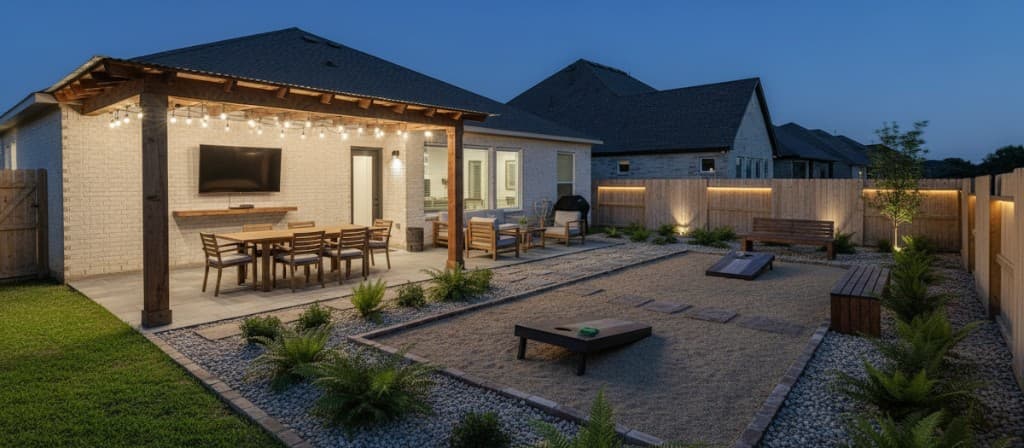
Hardscape is difficult to sell out loud.
"Picture a paver patio, running bond pattern, charcoal gray, stepping down two levels toward a retaining wall." That sentence is clear to you. You have laid thousands of square feet of paver. To the client standing next to you, it is just words. Retaining walls and bond patterns do not mean anything until they can see them on their property.
Hardscape visualization solves that specific selling problem — not landscaping in general, but the challenge of committing to permanent built materials before a single stone is placed.
Why hardscape hesitates differently than planting
Plants are forgiving. If a client does not love an exact shrub, it can move next season. Hardscape is not forgiving. Pavers, walls, fire features, outdoor kitchens — once installed, they stay. That permanence makes clients cautious, and caution often sounds like "let me think about it."
The path past caution is usually not a better pitch. It is removing the need to imagine. Show the material, the pattern, and the layout on the actual site — with the client's house in the background — and the conversation moves from "can you picture this?" toward "do you want this direction?"
From job-site photo to concept in minutes
The on-site workflow:
- Photograph the space — the slab to replace, the bare side yard, the sloped area that needs walls to become usable.
- Upload to Renderspace and select the hardscape direction that matches what you discussed.
- Adjust variables — paver color, wall material, layout options — in seconds between passes.
- Show two layouts side by side while the client is still on-site.
Concept generation happens in seconds; high-resolution output is typically available in minutes. Each additional direction costs clicks and credits, not a separate design fee.
What clients respond to on hardscape estimates
Clients rarely push back because they dislike pavers in abstract. They push back because they cannot tell whether charcoal gray running bond on their slope looks like what they have in mind. When the concept sits on their photo — house, fence line, existing grade — feedback gets specific: material, scale, access, shade. That is useful input for your takeoff even before you open a CAD file.
Contractors who pair on-site concepts with a written scope still do the estimating work they always did. The difference is fewer return visits spent re-explaining the same layout because the client "could not picture it."
For outdoor kitchen layouts specifically, see Outdoor Kitchen Rendering: From Job-Site Photo to Client Presentation.
Engineering and permits stay separate
A visualization tool is not an engineered drawing. It is not a load-bearing calculation for a retaining wall, a drainage plan, or a permit submission.
Structural, drainage, permit, and engineering requirements vary by project and jurisdiction and require the appropriate professional where applicable.
What photo-to-concept visualization replaces is the selling gap — helping a client picture direction — not the engineering gap. Confusing those two is how contractors either oversell what a render represents or undersell a job they could have aligned on earlier.
For an honest category overview — strengths, limits, and when to escalate — read AI Landscape Design Software for Contractors: What It Does Well—and What It Doesn't.
When a presentation package helps
Some hardscape jobs — full backyard renovations, multi-level projects, HOA design-review submissions — need more than a fast on-site concept. That is where Human Polish and Build-Ready packages fit.
AI Render Packs (25 / 50 / 100 concepts at $399 / $699 / $1,199, with a $349 first-purchase 25-pack) are for production handled by Renderspace's team from your approved direction, with delivery targets of 24–48 hours, 48–72 hours, or 3–5 business days depending on pack size.
Build-Ready Essentials 2D ($599, 3–5 business days) and Essentials 3D ($899, 5–10 business days) produce presentation-oriented packages from an approved concept and the files you supply. Scope is reviewed before you pay. These support client meetings and design-review presentations — not permit packages or construction documents.
Pairing visuals with your existing sales habits
Visualization works best when it slots into how you already sell — not as a separate "design meeting" you have to schedule later.
- Bring it to the walk-through, not the follow-up email three days later when enthusiasm has cooled.
- Show two directions, not ten. Clients decide faster when options are bounded.
- Label what the render is: a direction for discussion, not a build spec. That honesty protects you and sets correct expectations for HOA or permit steps down the road.
If the job also includes planting, pool decks, or structures beyond hardscape, the same photo workflow applies; the space-type and style controls just shift with the conversation.
Start with one real estimate
Hardscape sells on permanence, which is exactly why words alone stall so many bids. Give the client something to look at on their own property, and the conversation usually gets shorter and more concrete.
Test the workflow on your next hardscape walk-through with the First Job Test — $19.99, 40 credits, 7 days — before deciding whether it belongs in how you sell. When you are generating concepts weekly across crews, Professional ($99/month, 500 credits) or Business ($349/month, 6000 credits) may fit better than one-off tests alone.
Related reading
- AI Landscape Design Software for Contractors: What It Does Well—and What It Doesn't
AI landscape tools are fast at concepts from real photos. They are not site plans, engineered drawings, or permit packages. Here is how to evaluate the category without wasting an afternoon.
- Outdoor Kitchen Rendering: From Job-Site Photo to Client Presentation
Outdoor kitchens are hard to describe and easy to downscope when clients cannot picture them. Photo-to-concept visualization on-site keeps the full vision on the table.