
Are 3D Renderings Worth It for Contractors?
What 3D renderings cost, when a detailed model earns its price, and when a fast photo-based concept does the job better at the bidding stage.
By KeSean Fallon

Paying for 3D renderings is worth it for contractors when the image helps win the job, and at the bidding stage a fast concept often does that job without the wait or the per-image cost. Save full 3D for big, complex projects where layout or grading has to be shown precisely; for most bids, the homeowner just needs to see their own yard finished at the first meeting.
The real question is not "are renderings worth it" but "which kind, and when."
Before you spend hundreds on a backyard rendering, ask what you actually need it to accomplish. If the homeowner hasn't agreed on a layout, is a meticulously modeled scene really the best first expense? They might change their mind about the pool shape, the paver color or the whole patio arrangement after seeing one image. That's not a problem; that's how a design conversation works. The expensive part is treating each early idea like a finished presentation, when all you really need is a clear starting point.
What do 3D renderings cost?
Prices vary widely by provider and complexity. Cedreo, a home design software company, puts outsourced exterior renders at about $600 to $1,500 per image, and aerial or site views at roughly $300 to $2,000 per view, depending on terrain, landscaping and context modeling.
Then there is time. Studios build a 3D scene, light it, render it and retouch it, and every revision round adds days. We look at what that wait costs in what late-night rendering really costs before an estimate.
Here is how the main options compare:
| Option | Typical cost | Typical wait | Best for |
|---|---|---|---|
| Outsourced 3D render (studio or freelancer) | About $600-$1,500 per exterior image (Cedreo) | Days, more with revisions | Large or complex projects, marketing images |
| Renderspace self-serve | $99/mo Professional (500 credits), or a $19.99 First Job Test | About 30 seconds per render | Showing the client their own yard on the visit |
| Renderspace Human Polish | 25 concepts $399 ($349 on a first purchase) | 24-48 hours | Teams that want concepts made for them |
Full plan details are on the pricing page.
When is a 3D rendering worth paying for?
A detailed 3D model earns its cost when:
- The project is large and the client is torn between layouts.
- Grading, elevation changes or views from inside the house really matter to the decision.
- You need a hero image for marketing that will be used for years.
When is it not worth it?
Spending days and hundreds of dollars on every lead rarely makes sense when:
- You do not have the job yet and the client is comparing bids.
- The client mainly wants to see "my yard with a pool in it."
- The design will change three times before they sign anyway.
At that stage, speed beats detail. Rapidly generating photorealistic renderings helps contractors win bids faster, because homeowners commit sooner when they see their own space finished before the quote.
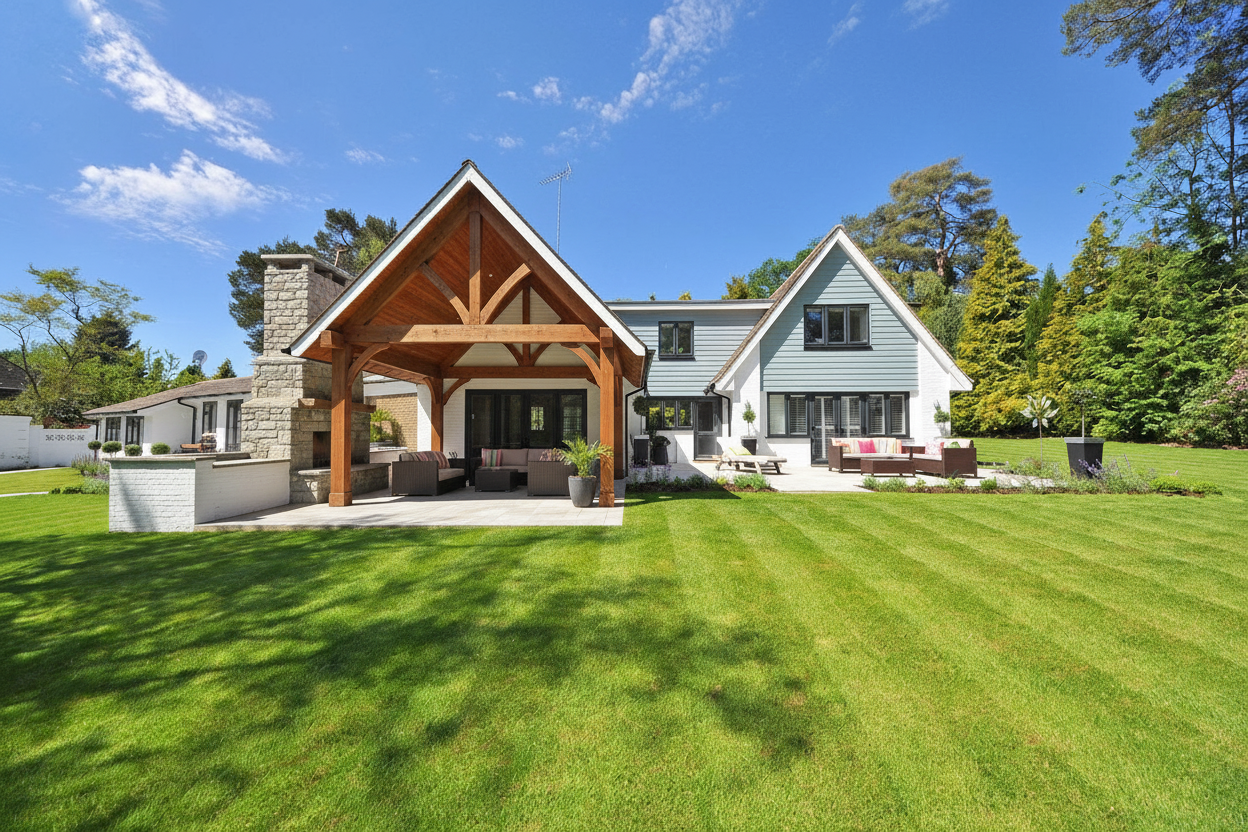
See this concept in the Renderspace gallery
I think the biggest waste is paying for precision before you've earned the client's commitment. A contractor might commission a beautiful model of a patio, only to learn the homeowner wanted a cedar pergola, slate pavers and more planting space. Those preferences should surface before the costly work begins. Use a photo-based concept to ask better questions. With Renderspace, you can put specific materials, landscaping details and design features directly into custom prompts, then explore what the client actually prefers.
What should a rendering never be used for?
A rendering, fast or slow, is for visualization and presentation. Crews and inspectors need dimensioned plans, and anything needing engineering or permits needs a professional who does that work. Renderspace concepts, Human Polish packs and Build-Ready Essentials plans are presentation and layout tools, not permit sets, stamped drawings or construction documents.
For more on the trade-offs, see AI rendering vs traditional rendering services and the Fiverr rendering alternative for contractors.
What this looks like on a real job
Consider a backyard renovation involving a patio, a small pool and an outdoor seating area. The homeowner has inspiration photos, but they're from other properties. The contractor could commission a detailed 3D model immediately, yet several basic choices remain open: stone or concrete around the pool, a pergola or open sky, hedges or ornamental grasses along the fence.
A more practical approach at this stage is to photograph the existing backyard and generate a first concept in Renderspace. From there, custom prompts allow the contractor to get remarkably specific: light travertine coping, large-format slate pavers, a cedar pergola, warm lighting around the seating area, even sculpted hedges with bronze statues. If the homeowner prefers limestone instead, that material can be changed and another version generated.
The rendering won't establish exact grading or construction costs, but it can help identify which direction is worth pursuing. Once the client has settled on a concept, investing in detailed 3D modeling makes considerably more sense.
Frequently asked questions
How much does a 3D rendering of a backyard cost?
Outsourced exterior renders commonly run hundreds to over a thousand dollars per image, depending on complexity and revisions. A Renderspace concept from a phone photo uses credits on a plan starting with a $19.99 First Job Test.
Are cheap renderings worth it?
A fast, low-cost concept is worth it when its job is to help the client picture the project and decide. It is not a substitute for construction plans.
Can I use renderings in my marketing?
With Renderspace, every paid plan may use renders in proposals, websites, social and ads. Reselling the images is not allowed.
I built Renderspace around a simple idea: contractors shouldn't need a full modeling budget just to ask a homeowner, "Does this look right?", and they shouldn't have to wait days or weeks for a freelancer or designer to produce an image that's just not quite right according to the concept. A quick image is useful, but control matters too. If the client wants marble instead of slate or a different planting style, they should be able to describe it plainly and see another concept.
Stop paying to wait. Start showing on the first visit.
Picture the next estimate. Normally you would walk the yard, go home, and either pay for a rendering that arrives next week or skip it and hope your description lands. Meanwhile, the homeowner talks to two other contractors.
Now picture taking a photo on the visit and, about 30 seconds later, showing them their own yard with the patio, the pool or the outdoor kitchen already built. They point at what they like. You change one thing. They start talking about when, not whether.
That is why fast photorealistic concepts help contractors win bids faster. Homeowners commit sooner when they see their own space finished before the quote.
The cost of finding out is small. The First Job Test is $19.99 for 40 credits over 7 days, and all you need is the phone in your pocket.
If you would rather hand it off, Human Polish render packs are made for you.
Related reading
- AI Rendering vs. Traditional Rendering Services for Contractors
A contractor-focused comparison of AI self-serve, Human Polish production, and traditional rendering studios across the workflow dimensions that actually matter.
- Fiverr Rendering vs. AI-Assisted Concepts for Contractors
Freelance renders, self-serve AI concepts, and Human Polish each optimize for different moments. Here is how to choose without assuming one path replaces the others.
- The Hidden Cost of Late-Night Rendering Before a Client Estimate
A Sunday-night estimate prep scene illustrates the real cost of slow visualization — and when self-serve or outsourced production buys the time back.